

A dog that moves from the living room to the kitchen can quickly leave a fixed camera’s view, while a camera with too many alerts can make remote monitoring frustrating. The right choice also depends on whether your home uses 2.4 GHz or dual-band Wi-Fi, whether you want local recording, and how much you value privacy controls over advanced app features.
This guide to Best Indoor Pan and Tilt Dog Cameras for Home Monitoring compares the listed options by view coverage, video resolution, pet detection, audio, storage, connectivity, and privacy features. It is designed to help you choose a camera that fits your dog’s routine and the room where you plan to place it.

Pros
- 2K video resolution
- Pan and tilt coverage
- Two-way audio
- Local microSD storage option
Cons
- Requires 2.4 GHz Wi-Fi
- Skip if your network lacks 2.4 GHz

Pros
- Two-camera package
- 2K live video
- Automatic motion tracking
- Two-way audio
- Remote privacy control
Cons
- Advanced features require a paid plan after one month
- Plug-in design requires an available power connection
- Skip it if you need battery-powered or outdoor monitoring

Pros
- 2K live video
- 355° horizontal and 90° vertical rotation
- Two-way audio
- TF card and cloud storage options
Cons
- Requires continuous power and 2.4 GHz Wi-Fi
- Advanced cloud features require a subscription after 30 days
- Who should skip it: users needing a battery-powered camera

Pros
- Included 64GB local storage
- Human and pet detection
- 360-degree pan and 90-degree tilt
- Two-way audio
- Dual-band Wi-Fi
Cons
- App limited to United States and Canada
- Not intended for placement behind or through windows
- Who should skip it: users needing outdoor or window monitoring

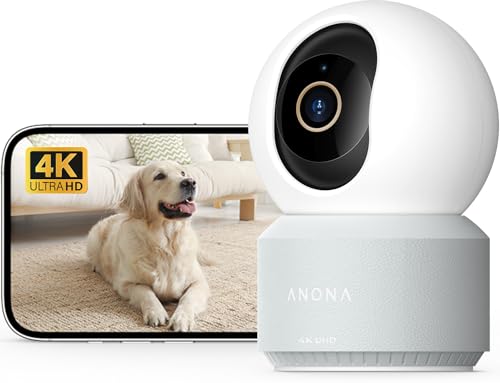
Pros
- 4K video with 8x zoom
- 360-degree pan and auto-tracking
- Pet detection alerts and two-way audio
- Cloud or microSD storage options
Cons
- microSD card is not included
- Who should skip it: buyers who need included local storage
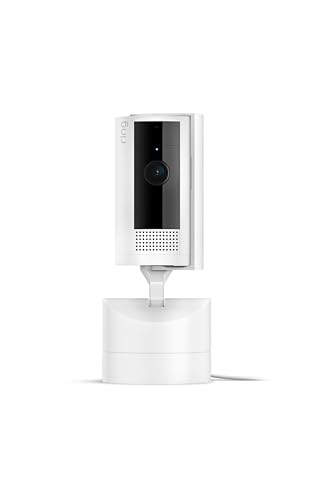
Pros
- App-controlled 360-degree pan coverage
- Vertical tilt adjustment
- HD video with Color Night Vision
- Live View and Two-Way Talk
- Alexa compatibility
Cons
- Requires nearby power outlet
- Ring Protect subscription sold separately
- Who should skip it: Users needing battery-powered placement

Pros
- Remote pan and tilt viewing
- HD day and infrared night video
- Two-way audio for people and pets
- Smartphone motion alerts
- Alexa compatibility
Cons
- Requires a power outlet
- Local storage needs separately sold equipment
- Who should skip it: Those avoiding subscriptions or separate storage accessories

Pros
- 2K video with pan and tilt
- Two-way audio and built-in siren
- Local recording option up to 512 GB
- Physical privacy mode
Cons
- microSD card sold separately
- Who should skip it: owners who need included local storage
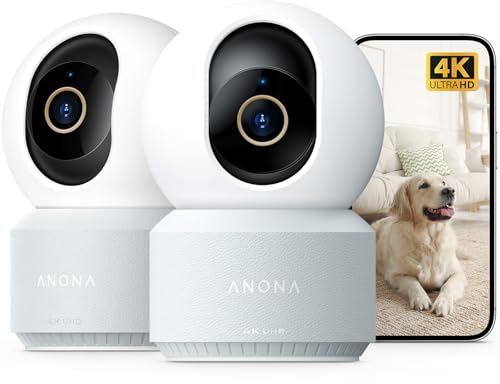
Pan, tilt, tracking, and room coverage
Pan and tilt controls matter when your dog is free to move around a room. A wider stated range can reduce blind spots, but coverage still depends on camera placement, furniture, and the camera’s vertical angle. The Tapo 2K Pan Tilt Security Camera for Baby Monitor specifies 360° horizontal and 114° vertical movement, while the Arlo Essential Indoor Pan Tilt Zoom Security lists 360° pan and 180° tilt with automatic motion tracking. The SensForge 2.5K Indoor Pan-Tilt Security Camera specifies 360° horizontal and 90° vertical movement.
Other options offer similar room monitoring with different tracking approaches. The WYZE Indoor Cam Pan, 2K Pan-Tilt Security Camera lists 360° pan, 103° tilt, auto-patrol, and four custom waypoints. Anona’s 4K models specify 360° pan, 110° tilt, and auto-tracking. Choose a camera whose lens can cover the areas where your dog actually rests, and verify that a shelf or wall position will not block the desired view.
Video detail and low-light monitoring
Higher resolution can make a distant dog easier to identify, but resolution alone does not guarantee a clearer image in every room. The Anona Pano 4K UHD Indoor Camera and the Anona 4K UHD Indoor Camera two-pack specify 4K video and 8x zoom. The SensForge model lists 2.5K video, while Tapo, Arlo, Cloarks, Luna, and WYZE list 2K video. Ring and Blink list HD video.
Night features differ as well. Tapo specifies infrared night vision up to 30 feet, Luna lists 2K color night vision with a built-in spotlight, Ring lists color night vision, and WYZE specifies invisible infrared night vision. If your dog spends time in a dim room, compare the stated night mode with your room layout and consider whether a spotlight could disturb the pet.
Pet alerts, sound detection, and two-way audio
Smart alerts can reduce unnecessary notifications, but each listing describes detection differently. Tapo specifies pet, person, motion, and baby-crying detection. Arlo lists animal and sound detection plus custom alerts, while SensForge lists human, pet, and motion alerts. Anona lists person, pet, and baby-crying detection, and WYZE lists AI motion and sound detection with custom zones.
Two-way audio is listed for all ten options, which can help you speak to a dog or hear activity remotely. Some models also include a siren, including Tapo, Cloarks, Luna, and WYZE. A siren may be useful for a security-oriented setup, but it is not automatically appropriate for every dog. If your main need is a calm check-in, prioritize clear audio and adjustable notification settings over deterrence features.
Wi-Fi, power, and app requirements
Every camera in this comparison is intended for indoor, plug-in use according to the supplied listings, so placement near an outlet is an important practical constraint. Tapo, Cloarks, Blink, and WYZE specify 2.4 GHz Wi-Fi requirements or operation. Arlo, SensForge, Luna, and both Anona models list dual-band connectivity, while Anona also specifies Wi-Fi 6. Ring connects through the Ring app and supports Alexa.
Dual-band support may be useful when your home network offers both bands, but it does not remove the need to check app compatibility and signal strength in the intended room. Alexa support is listed for Tapo, Ring, Blink, and Arlo, while Tapo also lists Google Assistant compatibility. Confirm the supported platform before buying if you want to view the camera on a smart display.
Local storage, cloud plans, and privacy
Storage affects both recurring costs and how you review missed activity. Tapo supports a microSD card up to 512GB and optional cloud storage. SensForge includes a 64GB SD card and states that no subscription is required for that local storage. WYZE supports local 24/7 recording with a microSD card up to 512GB, while Anona supports a microSD card up to 512GB but says the card is not included.
Cloarks supports TF-card storage up to 128GB and offers a limited cloud cycle before advanced features require a subscription. Blink’s local option requires a Sync Module 2 and USB drive, both sold separately, while Ring and Arlo promote additional features through separate subscription plans. Luna supports a memory card up to 256GB or cloud storage. Privacy controls are especially clear on Arlo, Luna, Anona, and WYZE, each of which lists a mode that moves or turns the camera away from the room. Check exactly what remains available without a plan before purchase.
How We Compared These Products
This comparison is based on the supplied product listings, including stated resolution, viewing ranges, detection features, connectivity, storage options, audio functions, and privacy controls. We also considered the listed customer ratings as product-page information, but no firsthand evaluation or independently measured performance was provided, so real-world alert accuracy, image quality, noise, and network reliability should be verified for your home.
Which Option Fits Your Pet and Home?
For local recording with included storage: Home monitoring equipment is easier to plan when you know whether a card is included. The SensForge 2.5K Indoor Pan-Tilt Security Camera listing includes a 64GB SD card and describes local storage without a subscription. It also lists dual-band Wi-Fi, pet alerts, and two-way audio. Pros include included local storage and broad detection support. Cons include a 90° listed vertical range, and optional AI video descriptions require a Pro Membership. Who should skip it: buyers who need a specific ecosystem integration not listed in the supplied data.
For advanced tracking and dual-band connectivity: The Arlo Essential Indoor Pan Tilt Zoom Security lists 360° pan, 180° tilt, automatic motion tracking, animal and sound detection, and dual-band Wi-Fi. Pros include broad stated movement and custom alerts. Cons include subscription-based advanced features after the included trial period. Who should skip it: buyers who want all recording and AI functions to remain available without a paid plan.
For a two-camera setup: The Anona 4K UHD Indoor Camera two-pack is the listed option intended for monitoring two locations, and it retains 4K video, 8x zoom, auto-tracking, dual-band Wi-Fi 6, and privacy mode. Pros include coverage for separate rooms and detailed video. Cons include the need to buy a microSD card separately, and a two-camera setup requires more outlets and app configuration. Who should skip it: buyers monitoring only one small area or those who prefer a lower-complexity setup.
For a compact, simple plug-in camera: The Blink Mini Pan-Tilt Camera lists 360° coverage, HD video, motion alerts, two-way audio, Alexa support, and straightforward plug-in setup. Pros include a simple feature set and flexible cloud or separately purchased local storage. Cons include HD rather than 2K or 4K video, and local storage requires additional hardware. Who should skip it: buyers who specifically want included local storage or higher listed resolution.
For a privacy-focused 2K option: The WYZE Indoor Cam Pan, 2K Pan-Tilt Security Camera lists physical privacy mode, auto-patrol, custom waypoints, local 24/7 recording, and a siren. Pros include several useful room-monitoring controls and a local recording path. Cons include the need to purchase a microSD card separately, while cloud backup and AI alerts are associated with Cam Plus. Who should skip it: buyers who do not want to manage a memory card or subscription options.
The remaining choices also involve clear trade-offs. Tapo offers 2K video, a 512GB microSD option, pet detection, and Alexa and Google Assistant support, but it requires 2.4 GHz Wi-Fi. Cloarks combines 2K video, color night vision, a one-click call feature, and TF or cloud storage, but its listing specifies 2.4 GHz Wi-Fi and continuous plug-in power. Luna offers dual-band Wi-Fi, a spotlight, privacy mode, and motion zones, but advanced alerts require a subscription after the free trial. Ring provides 360° pan control, color night vision, Alexa integration, and two-way talk, but several extra features require a Ring Protect subscription. The Anona Pano 4K UHD Indoor Camera offers 4K video, 8x zoom, auto-tracking, dual-band Wi-Fi 6, and local or cloud storage, but local storage requires a separately purchased card. Pros and cons for each depend on whether your priority is resolution, ecosystem compatibility, local storage, or recurring-plan avoidance. Who should skip each one: buyers whose network, storage, or subscription preferences conflict with the stated limitations.
Frequently Asked Questions
Do these dog cameras work without a subscription?
Some core features can work without a subscription, but the details vary. Tapo supports microSD storage, SensForge includes a 64GB SD card, and WYZE lists local recording with a separately purchased microSD card. Arlo, Ring, Luna, Blink, and some other models reserve certain history, AI, or advanced alert functions for subscription plans. Check the current app terms before buying.
Which cameras support 5 GHz Wi-Fi?
SensForge, Arlo, Luna, and both Anona listings specify dual-band 2.4 GHz and 5 GHz connectivity. Tapo and Cloarks specify 2.4 GHz operation, and the Blink and WYZE listings also identify 2.4 GHz networks. Confirm your router and the camera’s current requirements before installation.
Which option has the highest listed video resolution?
The two Anona listings specify 4K UHD video and 8x zoom. SensForge lists 2.5K, while Tapo, Arlo, Cloarks, Luna, and WYZE list 2K. Ring and Blink list HD video. Resolution is only one factor, so also consider lighting, placement, storage, and app features.
Can I use these cameras to monitor a dog at night?
All of the supplied listings describe some form of night or low-light viewing. Tapo lists infrared night vision up to 30 feet, Ring lists color night vision, Luna lists color night vision with a spotlight, and WYZE lists invisible infrared night vision. The other listings should be checked for the specific night mode and placement requirements that suit your room.
Does pan and tilt guarantee that every part of a room will be visible?
No. A stated movement range describes the camera’s mechanism, not guaranteed coverage in every room. Furniture, corners, mounting height, and the dog’s position can still create blind spots. Place the camera where its listed horizontal and vertical range can cover the areas your pet uses most.
Are sirens suitable for every dog?
A siren is a listed feature on several models, including Tapo, Cloarks, Luna, and WYZE, but the product data does not establish how an individual dog will react. If your purpose is routine companionship rather than security deterrence, prioritize two-way audio, useful alerts, and a privacy mode, and introduce any sound feature cautiously.
What should I verify before installing an indoor pet camera?
Verify outlet access, Wi-Fi band compatibility, app requirements, storage costs, and whether the camera’s pan and tilt range covers the intended area. Keep cords positioned so your pet cannot chew or pull them, and follow the manufacturer’s installation and electrical guidance. For a camera used around children or other household safety concerns, review the manufacturer’s applicable safety information and current standards information rather than assuming a listing feature is a certification.








Write Your Review
No reviews yet. Be the first to share your experience!